
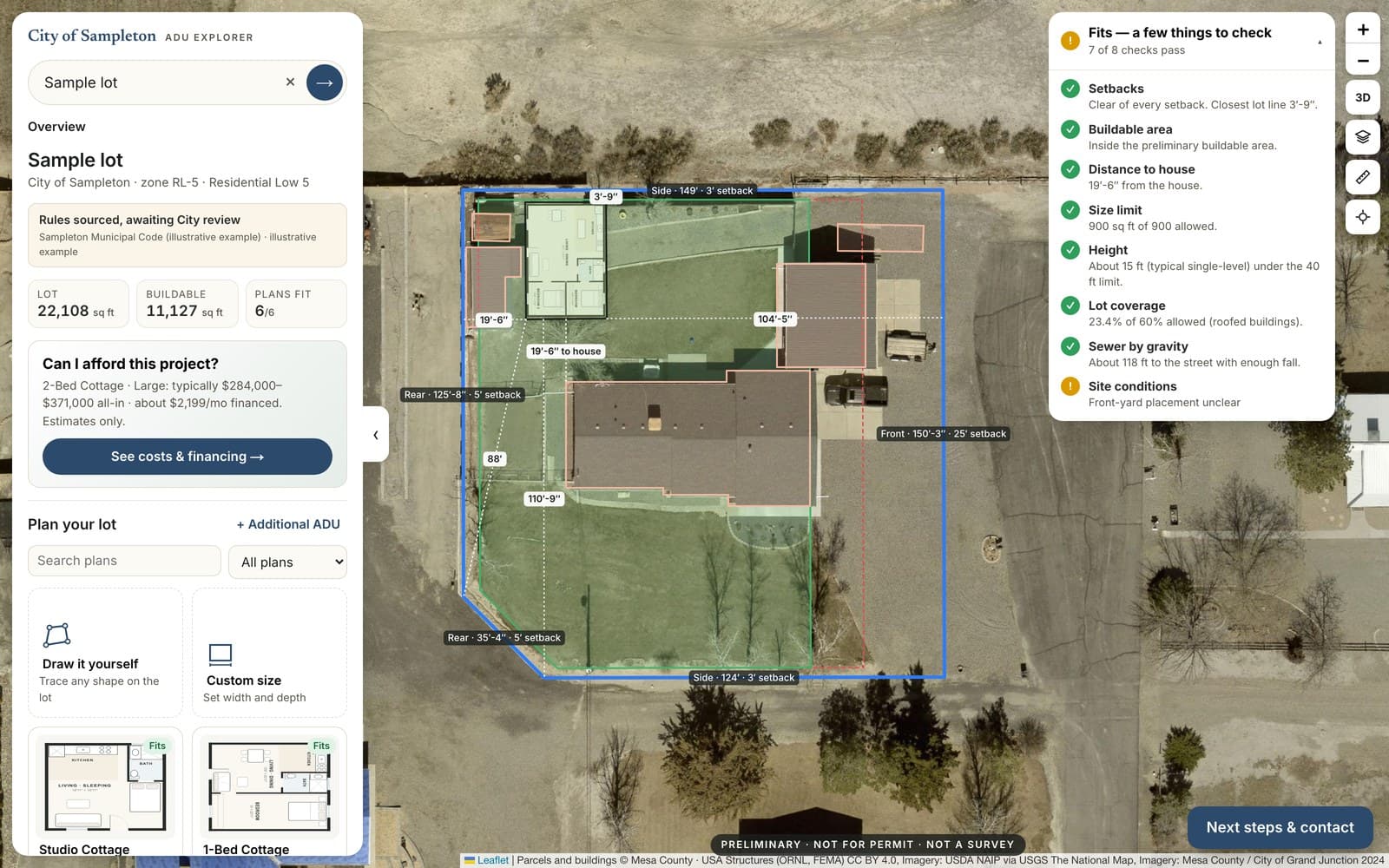
An accessible ADU portal must let residents complete the whole planning journey, not merely reach an accessible homepage. Address entry, map results, rule explanations, plan documents and the handoff to permitting all have to work for people using keyboards, screen readers, magnification and mobile devices. Evaluate those tasks together before procurement or launch.
This is a testing and purchasing framework, not a legal determination or accessibility certification. Agency counsel and qualified accessibility professionals should confirm the requirements that apply to the jurisdiction and service, including any state accessibility laws that apply in addition to federal rules.
Use the current rule and compliance dates
As of November 8, 2026, DOJ's April 2026 interim final rule extends the Title II web-rule compliance date to April 26, 2027 for entities with populations of 50,000 or more, and April 26, 2028 for smaller entities and special district governments. Confirm current status and entity classification with counsel before relying on a deadline.
The rule's technical standard is WCAG 2.1 Level AA. A deadline does not mean other applicable accessibility obligations disappear until that date. DOJ's web accessibility guidance describes the broader obligation to make online services accessible. Review the service as a whole and obtain current legal guidance.
Define accessible ADU portal tasks before evaluating a vendor
List the tasks the portal promises: enter or identify a property, understand preliminary findings, inspect source information, compare a plan and reach the appropriate office. Include unsupported addresses and missing-data cases.
For each task, specify the information the resident must receive and the action they must be able to complete. This prevents testing from stopping at a map that looks attractive but cannot be used with the available assistive technology.
Test the failure path too
An address that is not found should produce understandable guidance and a usable way to continue. An error message should identify the problem without relying only on color or an unexplained icon. Test how a resident returns to the form and corrects input.
Provide a meaningful alternative to map-only information
Ask how the interface communicates the parcel, applicable rule findings, source links and next steps without requiring visual interpretation or precise dragging. A text alternative must convey the relevant information, not merely say "map of property."
Where moving a plan is part of the experience, evaluate keyboard and other usable controls with qualified testers. If a feature cannot provide an equivalent accessible path, the agency and vendor need to resolve that limitation before claiming the journey is accessible.
The W3C WCAG 2.1 standard supplies the technical criteria for evaluation. Use a qualified assessment rather than treating a single automated scan as a conformance finding.
What experienced reviewers check in an accessible ADU portal
Builders, designers and residents use the same portal, and the problems they hit tend to cluster in a few places. A practical review walks each task and checks:
- Keyboard-only use. Can someone enter an address, choose a parcel, open results and reach every control without a mouse, with a visible focus indicator throughout?
- Results announced to screen readers. When findings load on the same page, WCAG 2.1 expects status messages to be conveyed to assistive technology without moving focus. A silent update looks finished but tells a screen-reader user nothing.
- Reflow and zoom. Results and rule explanations should remain readable when magnified, without side-scrolling on a narrow screen.
- Contrast in legends and overlays. Setback lines, zoning colors and map legends should not depend on color alone, and text over imagery needs adequate contrast.
- Timeouts. If a session expires, the resident should be warned and able to extend it rather than losing entered information.
- Plain-language rule summaries. Results should say what a finding means and that it is preliminary, not only cite a code section.
- Repeatable reports. Builders often check many parcels. A downloadable summary should carry the same headings, source links and preliminary-status language as the screen.
These checks do not replace a qualified evaluation, but they quickly show whether a demonstration reflects the resident's real path.
Include documents and handoffs
Check downloadable plans, generated reports and linked instructions as well as the interface. Ask whether headings, reading order, tables and meaningful descriptions survive export. Residents should be able to understand that a report is preliminary regardless of how they access it.
Follow the next-step link into the permit portal or appointment process. Identify where responsibility passes to another system and how residents receive assistance. An accessible planning front door can still lead into an unusable application workflow.
See it set up with your code
A resident ADU portal built from your adopted ordinance, parcel data and next steps, reviewed by your staff before launch.
Make acceptance evidence concrete
Request a test plan, findings, remediation record and retest evidence for the actual configured service. Define which browsers, assistive technologies and resident tasks are covered. Include manual testing and feedback from people with relevant access needs where practical.
Distinguish design intent, a vendor's self-assessment and independent evaluation. None should be represented as a stronger claim than the evidence supports. Record remaining issues and the responsible party in the launch decision.
Keep the workflow accessible after launch
Assign responsibility for checking new documents, rule changes and interface updates. Provide an understandable contact route for accessibility problems and define how requests are handled. A one-time assessment does not ensure every later upload remains usable.
Review the service when a material feature changes. Preserve evidence of remediation and avoid publishing an unqualified compliance statement that the current configuration has not earned.
Bring accessibility into the demo
Ask for the non-map workflow during an ADU Insights municipal demo. Pair the task list with the planning-department portal article and request evidence for the configured service before making public accessibility claims.