
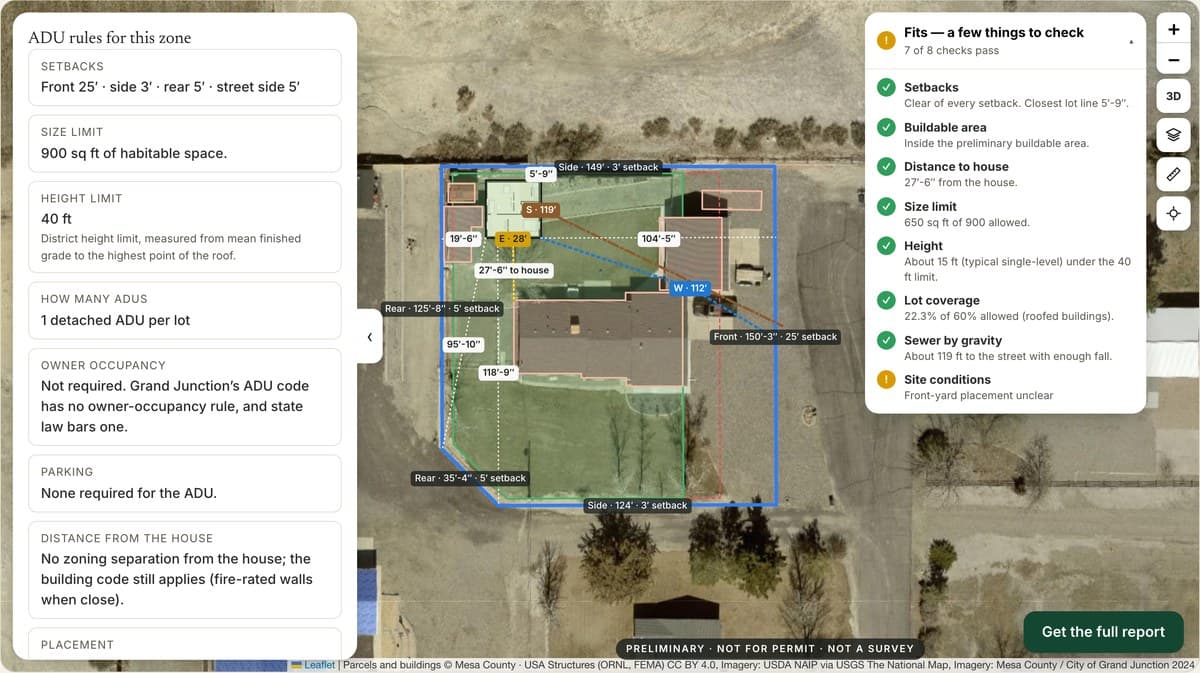
Judge an ADU planner on your website by the projects it helps you start, not by clicks. Clicks and sessions tell you whether people use it. What matters to a builder is whether better inquiries show up, whether more of them turn into site visits, and whether fewer of those visits end in a no-go you could have seen coming. Decide how you will count those things before you turn the tool on.
Decide what a qualified ADU lead is before you look at results
Sit down with whoever answers the phone and whoever does estimates, and agree on one definition. For most of us it looks something like this: the lot is in our service area, the person owns it or can make the decision, the project is something we build, they have heard a realistic price range, and there is a clear next step.
Keep "qualified lead" separate from "buildable lot." Someone can be worth a conversation while the site is still unknown. Zoning, setbacks, utilities and fees vary by city and county, so write down what is still uncertain instead of treating an online lot check as a permit answer.
Use stages you can actually tell apart
Write down what counts as an inquiry, a first call, a site visit, a proposal and a signed contract. Skip a stage called "interested" unless everyone on the team would use it the same way. Decide how you will handle duplicates and people who come back months later.
Track a few actions, and track them properly
You only need a handful of events to see the path: planner opened, address looked up, plan picked, inquiry sent. Count an inquiry when it actually lands in your inbox or CRM, not when someone clicks the button.
Google's guidance on key events shows how to mark actions like these in Analytics. A key-event count is a setting, not proof that the planner made you money.
Keep private details out of general analytics. You don't need a homeowner's address in a traffic report to count a completed step. Privacy rules differ by state, so check your site's notices if you are unsure.
Get a baseline first
Before the planner goes live, write down where your inquiries come from today, roughly how many you get, and how many turn into site visits. Note anything else that changes during the trial: a new ad, a slow season, a salesperson on vacation. Any of those can move the numbers on their own.
Most builders don't get enough website traffic for a clean A/B test, and that's fine. Just say so. "Here is what happened in 60 days" is honest. A big percentage lift worked out from a few dozen inquiries is not.
Follow each inquiry to the end
Give every inquiry a reference you can carry into your CRM or estimating sheet, so you can see later whether it became a visit, a proposal or a contract. When one drops off, write down why: outside the area, utilities, financing, timing, wrong product.
A planner might not raise the number of inquiries at all and still be worth it, if the ones you get show up with the lot basics already answered. And a jump in form fills means little if most are duplicates or tire-kickers. Keep what you saw separate from what you conclude. "Leads arrived with better site information" and "the planner increased sales" are two different claims, and each needs its own evidence.
What we look at on the first call
On the ADUs we build, the useful signals are practical:
- Did the lead arrive with the site basics? Address, lot shape, where the owner pictures the unit, and whether the main house is on sewer or septic. Each one saves a question and gets you to a site visit faster.
- Did they pick a realistic plan? A plan chosen against the lot's setbacks and access is a better starting point than a photo from the internet, even if the design changes later.
- Was the site-cost talk easier? Utility runs, panel size, slope and equipment access are what separate a plan price from a project price. Notice whether planner users already expected that.
- How many site visits ended in a no-go? Count visits that stopped for something the planner could have flagged, like an obvious lot constraint or an address outside your area.
- Is your plan catalog current? Old pricing or a discontinued model sets the wrong expectation faster than it creates a lead. Make it someone's job to keep it up to date.
These are judgment calls, so jot them down after each call instead of trying to remember them at the review.
The Investor’s ADU Guide
Underwrite the deal honestly, then build a unit tenants choose and stay in — for no more than an ordinary one costs.
Count the cost honestly
Add up the software, the setup, keeping the catalog current, and the time your team spends on the extra inquiries. Compare that with the projects you can actually trace back to the planner. Don't credit it with every contract you signed during the trial.
Watch the failures too. Addresses the tool can't look up, confusing screens or errors explain a lot of drop-off, and fixing one clear problem can be the most useful thing a trial turns up.
Decide what the trial tells you
At the end, ask three questions. Is it accurate enough for a first look at a lot? Do inquiries arrive with useful context? Is it worth the time to keep running? Write down what you still don't know and what you would test next, and don't turn early results into a number you put on your website.
See it on a real lot
Run a free ADU lot check to see what a homeowner gets, then bring your own sales stages to an ADU Insights builder demo. For the rest of the process, read how to qualify ADU lots before the site visit and what to send an ADU lead after they inquire.